|

To access settings:
| • | Click File then Settings from the menu bar |

Because a change in settings affect all users, it is restricted to ADMIN only.
The APK© program ships without an ADMIN account. The first time you access APK you will be asked to setup the admin account.
Consult print-out
Header - Enter the "title" of your consult form in the text box. The default is "dosing consultation".
Bardcode: Data to encode
Select the barcode content: MRN (Medical Record Number) or free text. If selecting free text, enter the text you wish to encode.
Bardcode: Position
Select the position on the consult where the barcode will print.
Serum creatinine
Adjust for IDMS SrCr - IDMS SrCr is usually reported at 10-20% less than traditional SrCr.
If your lab reports creatinine via the IDMS method then you may choose to adjust the SrCr used in CrCl equations.
Enter the linear regression equation used to correct the SrCr (Y' = aX + b):
a = regression coefficient
b = intercept of the line.
Use minimum SrCr - click the checkbox to employ a minimum creatinine in CrCl equations. Then enter the minimum SrCr you will be using.
Creatinine clearance weight adjustment
These parameters determine the magnitude of the obesity correction factor and the point at which it begins.
These factors are used to calculate the Adjusted Body Weight used in the Cockcroft and Gault ABW equation.
% of weight above lean body weight
A correction factor (CF) is used in the AdjBW equation as follows:
AdjBW = LBW + [CF x (TBW - LBW)]
| • | The CF is 20% by default, but may be changed to fit your preference. |
| • | To always use LBW (never correct for obesity) change CF to zero. |
| • | The allowable range is 0 to 100%. |
If BMI greater than
Enter the BMI threshold where the correction factor is to begin. The default is BMI > 30.1. The allowable range is BMI 30 to 40.
Login policy
Close login to new users
| • | Check this box to only allow ADMIN account to add new users (Closed login policy). |
| • | Uncheck to allow new users the ability to add their own log in (Open login policy). |
The APK program ships with an Open login policy (otherwise no one would be able to log in!).
To comply with HIPAA standards, the login should be closed thereafter.
Enable strong password requirement
When this box is checked users passwords must comply with all of the the following rules:
| • | Length: 9 to12 characters |
| • | Case: must contain both lower and upper case characters |
| • | Number: must contain at least one number |
| • | Symbols: must contain at least one of the following symbols: |
! (exclamation), @ (at), # (pound), $ (dollar), % (percent), ^ (caret), * (asterisk),
( left parenthesis, ) right parenthesis, - (minus), + (plus), = (equals).
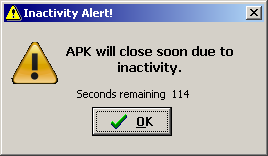
Enable auto log off after inactivity
When this box is check APK will warn after 5 minutes of inactivity.
| • | You will then have 2 minutes to continue or your session will be terminated. |
Recommended for multi-user environments.
Click OK to restart the inactivity timer.
Turn off automatic check for update
When this box is checked APK will not automatically ping the web site for updates.
Recommended for multi-user environments.
It will then be up to you to periodically check the web site for available updates (which are free in perpetuity FYI).