|

Click File on the menu bar then click Edit database | Import

Because this function is so powerful, it is restricted to the ADMIN account.
This function allows you to import new users or physicians from an Excel spreadsheet saved as a CSV file.
Select the target database (user or physician), then click Import.
The source file you created in Excel must be present in the APK folder on your network drive.
Instructions for importing User data from Excel
| 1. | Set column format to General |
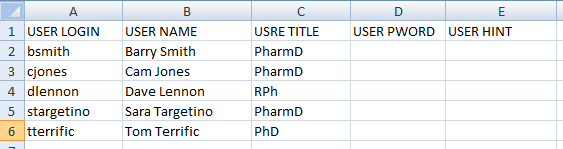
| 2. | Create 5 columns, the first row is the data descriptors. |
| 3. | Enter user login, name, and title under the first 3 columns, one row per user. |
| 4. | DO NOT put any commas in the name and title fields |
| 5. | Leave columns D and E (password and hit) blank |
| 6. | When completed, click "Save As", then "Other Formats" |
File name: USERS.CSV
Save as type CSV (Comma delimited) (*.csv)
7. Copy this file to the APK folder on your network drive.
Example:
Instructions for importing Physician data from Excel
| 1. | Set column format to General |
| 2. | Create 1 column, the first row is the data descriptor. |
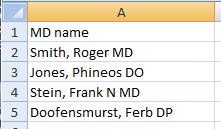
| 3. | Enter MD names under the column in the following format: LastName, FirstName Title |
| 4. | Enter only one comma, between the last and first name. |
| 5. | When completed, click "Save As"", then "Other Formats" |
File name: MD.CSV
Save as type CSV (Comma delimited) (*.csv)
7. Copy this file to the APK folder on your network drive.
Example: