“It is nothing but a rewrite”

The other night while watching the Mars landing I mentioned to Brad that I know someone who works at JPL. Will Duquette, the author of the desktop wiki we had used for years, is a programmer at JPL. Trying to find his bio I did a quick google search for “will duquette desktop wiki”. Instead I discovered this “review” of RikiTikiWiki as the third result: Taking note: August 2011.

I took exception to some of the reviewer’s “points” (especially the ones he decided to print in bold). So, I filled out a comment from the link on his blog page. He didn’t publish one word of my comment. What kind of dick does a hatchet job of a review and then doesn’t publish comments from the software author? Anyway, for the record, here is what I said:

  • Thanks for the kind words about my little program. I would like to clarify a couple of points in your post.
  • Will Duquette is my friend, and I have used his Notebook application for years. When he stopped developing it, I asked for and received his permission to use his basic idea as the basis of my software. Both within the software documentation and on my web site I credit Will with the original software idea. Will’s desktop wiki has been extremely useful to our practice. I have presented and published a paper describing how helpful the wiki is in our hospital pharmacy. In both the presentation and the publication I credited Will’s software with helping to structure our practice.
  • I had asked Will multiple times if he was working on a new version. His answer was yes, but it was a low priority and he simply did not have the time. So, I bit the bullet and wrote this little program, which is an incremental improvement over Notebook.
  • So, your remark “It is nothing but a rewrite in Delphi of Will Duquette’s Notebook application”, is partially true. But, by leaving out my acknowledgement of Will’s software and his permission, you make it sound like I stole his idea.
  • Although I kept Will’s basic interface, I did add some features which make the wiki more useful for us.
  • The main reason I had to rewrite Will’s Notebook was that his was not multi-user enabled. We had a few instances of one user deleting another user’s work. A related problem was Notebook did not keep a history of edits. Another essential wiki feature missing from Notebook is a log of who had made the edits.
  • Regarding your comment about my installation instructions: the purpose of the software is to maintain a shared knowledge base on the hospital intranet. Thus the instruction which states “install the wiki into “a shared folder on the network” and to give all staff read/write privileges”.
  • Another point I’d like to clarify is the donation request. The software is fully operational and 100% free to use, there are no restrictions. I do ask for a donation, this is not required. I ask for donations from my fellow pharmacists to help defray the cost of developing and maintaining the software. This is an example of the software licensing model called Donationware. I also state that the source code is available on request.
  • RikiTikiWiki was written for a specific audience, hospital pharmacists, and (as far as I know) is only available from my web site. I am curious how you came into possession of it?

Regarding my last point, I have since discovered that RikiTikiWiki has been uploaded to a bazillion different download sites and torrents (softpedia.com, softango.com, softsea.com, brothersoft.com, famouslywhy.com, fileguru.com, etc, etc). None of these sites have my permission to distribute my software! WTF?

RikiTikiWiki for Windows

RikiTikiWiki screen shot

Don’t put all your eggs in one basket

Since I have failed spectacularly at adding ajax to my asp.net 2.0 web apps, I’ve been looking for alternatives. NS Basic/App Studio is a newer web application builder that is approaching maturity. NS Basic/Palm has been in my toolbox for 12+ years, it’s what I used to write PalmOS programs. Their latest product, App Studio, takes an easy to comprehend, integrated approach to building javascript enabled web apps.

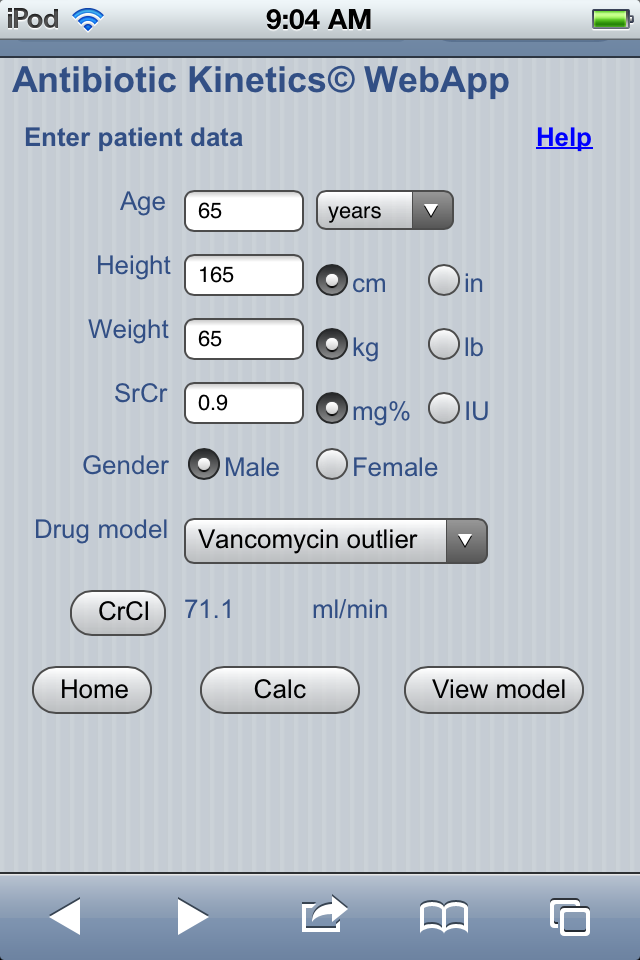
I’ve been trying it out for a couple of days, to get a feel for what it can do and how the code functions. Below is a screenshot of the patient data entry screen of AbPK on an iPod touch. Aesthetically, it’s much more pleasing to the eye than the current asp.net version.

Abpk_NSbasic_iOSIt doesn’t do much yet, other than calculating CrCl, but feel free to try it out here: AbPK web app

The main advantage of App studio is, I can deploy it on my Linux server and drop the expensive Microsoft server, leaving that hard to manage asp.net crud as a bad memory.

The only problem is, NS Basic/App studio is targeted for handheld devices. On the desktop it will run under the Chrome and Safari browsers on Windows and OSX, but fails to run under Firefox or Internet Explorer.  The average corporate Joe, working under the thumb of an oppressive IT dept, won’t be able to run this app on his locked down desktop at work.  Then again, maybe that’s not such a bad thing.

RxKinetics.Net WebApp

Today I updated the WebApp asp.net site.

  • Changed the default CrCl weight to lean body weight
  • Changed the Vancomycin model names to something more functionally descriptive: “normal” and “outlier”, instead of “CL” and “Kel”.
  • Added BMI to calculated data display.
  • Allow serum level outside of dosing interval for single point Bayesian.
  • Updated the help file to reflect the above changes.
  • Changed the underlying CSS to make the site more iPhone-like, here is a screen capture:

rxkinetics.net screen capture

Weekly wrap up

Pharmacists are required to determine calcium and phosphate compatibility in TPN solutions. The most reliable method is to visually evaluate compatibility with a solubility curve. Solubility curves are incorporated into the TPNassist program, and I wanted to see if I could duplicate that in a web page. After playing around with google chart wizard for a couple of hours I was able to produce a good looking graph.Calcium phosphate solubility curve

The next step was to break down and reassemble the URL generated by chart wizard in order to create a curve with a marker for specific calcium and phosphorous concentrations. The result of this effort is found on the web site’s TPN osmolarity calculator.

In other news, all versions of AbPK that were submitted in the last month have been approved at various online “stores”. But the reality is, I have given these multimillion dollar corporations a license to steal from what little money I make from this low selling niche app. All of these stores take 25-30% right off the top of the retail price. Amazon also charges $100 per year just for the “privilege” of hosting an app. They (and Apple) don’t even attempt to disguise the fact that they are picking the pockets of app developers.

At least Blackberry was giving away a free Playbook if your app was approved. Of course they drug their feet for weeks, and didn’t approve the app until after their giveaway expired. But according to the terms of their giveaway offer, the app had to be submitted before March 2, which it was. So, we’ll see if they actually follow through. 

App store links:

Amazon Android app store (Kindle fire)

Amazon Android app store (phones, etc)

Barnes and Noble (Nook Color)

Blackberry App World (Blackberry Playbook)

And finally, I found some time to throw together a how-to screen-cast for the Android version of AbPK:

androidcookbook.com

This week was spent working in Eclipse/Java on the Android platform. After finishing the Nook and Playbook apps, work was completed on much needed updates to AbPk for Android, including the following

  • Added IDMS SrCr adjustment to preferences screen
  • Added support for multiple size screens (including tablets)
  • Added T90%/T95% calculation to model display and consult email function
  • Added mg/kg calculation
  • Allow single point Bayesian outside dosing interval

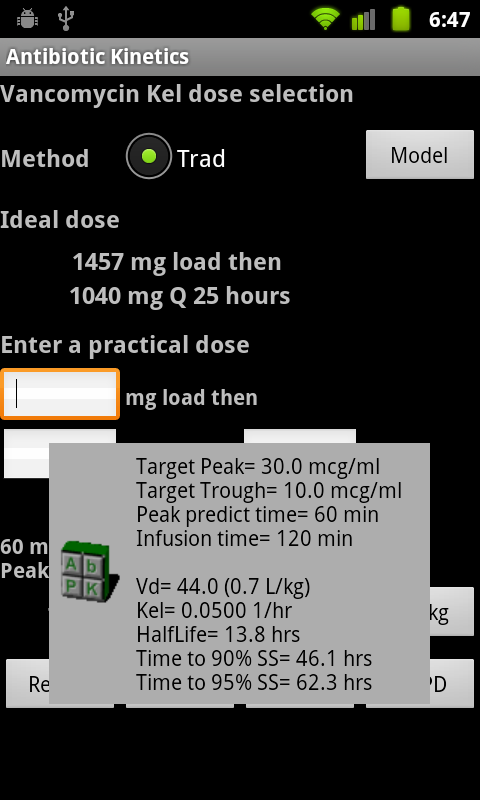
Also did some sprucing up of the screen layouts, and added a custom Toast layout for the information dialogs.

Custom toast

PK model popup

XML for custom Toast


Java for custom Toast

// Custom toast view
protected void getCustomToast(String message) {
LayoutInflater li = getLayoutInflater();
View toastlayout = li.inflate(R.layout.custom_toast,
(ViewGroup) findViewById(R.id.toast_layout_root));

TextView text = (TextView) toastlayout.findViewById(R.id.toastText);
text.setText(message);

Toast toast = new Toast(this);
toast.setDuration(Toast.LENGTH_LONG);
toast.setView(toastlayout);
toast.show();
}

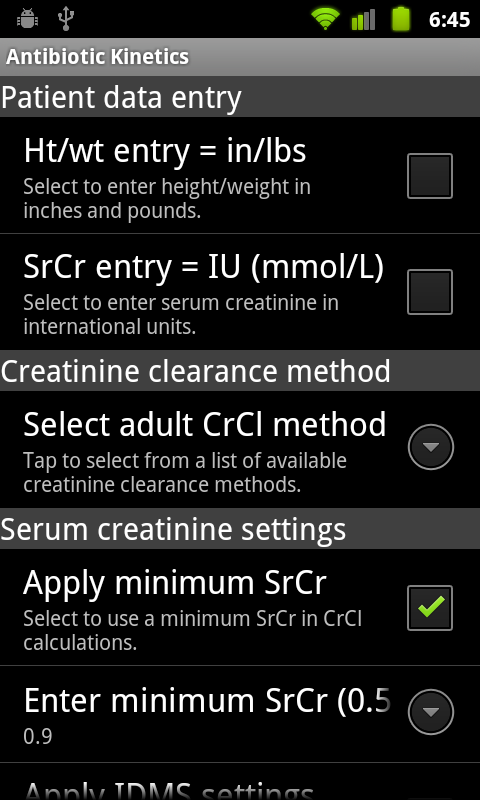
Also changed the formatting on the preferences layout, which has been broken since Android 2.3 (section heading font is smaller than the sub element). Here is the customized preference screen:

Preferences

Preferences layout

XML for preference screen


The biggest roadblock I ran into was resetting an out of range preference. The check code is within the onSharedPreference change listener. If a value entered by the user is out of range, then the preference is reset to the default value with this code:

// Min SrCr text change
if (key.equals("editTextMinSrCr")) {
String MinSrCr = sharedPreferences.getString(key, defaultMinSrCr);

// Save or Reset w/error
if(CheckMinSrCr(MinSrCr)){
prefMinSrCr.setSummary(MinSrCr);
}else{
// Reset to default
prefEditor.putString(key, defaultMinSrCr);
prefEditor.commit();
getCustomToast(errMessage);
}
}

However, the editor continues to display the new (wrong) value. It was about to drive me crazy, I checked every post on Stack Overflow to no avail. The people who answer questions there work in Java all the time and argue about whose code is more “elegant”, I just want some practical advice. Google’s Android dev site is a comprehensive encyclopedia, but it gives absolutely no examples. After searching for two days I finally ran across this page on the Android Cookbook web site:
Default shared preferences consistency check

The article contained this revelation: “even if the SharedPreferences contains the right value, you won’t see it displayed correctly. For this reason, you need to reload the preferences activity.”

And that was it, added a reload procedure, and it worked.

if(CheckMinSrCr(MinSrCr)){
prefMinSrCr.setSummary(MinSrCr);
}else{
// Reset to default
prefEditor.putString(key, defaultMinSrCr);
prefEditor.commit();
reload();
getCustomToast(errMessage);
}

private void reload(){
startActivity(getIntent());
finish();
}

I would never have been able to deduce that on my own. So, thank you Android Cookbook, you are now my go-to resource.

Downgraded WordPress to version 3.1.4 from 3.3.1, the insert image functionality and the code formatting plugin are working again.

NookColor and Blackberry tablet apps

Was able to put the finishing touches on both the Nook and Blackberry tablet apps today.

Now awaiting vendor approval from Blackberry, and submission review approval from Barnes and Noble.

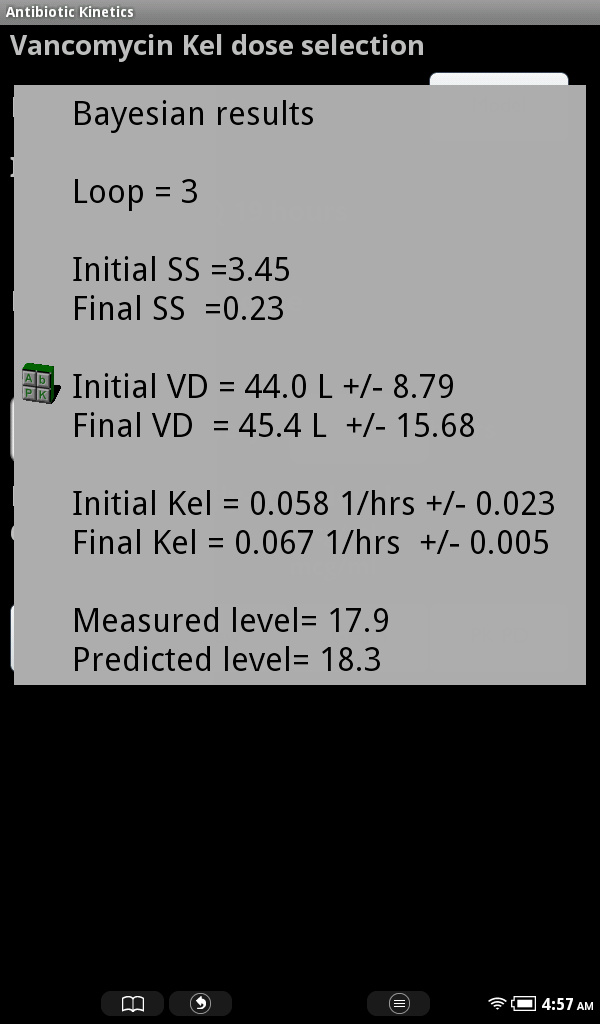
Here is a screen shot of the custom toast layout used for popup messages:

Nook Color

Bayesian results

Frustrated, Incorporated

Apparently the blog importer I was using is no longer supported by Facebook, so hopefully this one (NetworkedBlogs) will work. I decided to play around with the layout theme, and added a photo I took of the beautiful Flint Hills area around Emporia, Kansas.

Well, I started out the week attempting to update the rxkinetics.net web app. My plan is to add the ability to change and save settings and pk models, using the localStorage functionality in HTML5. But, localStorage is via JavaScript on the client side (web browser), whereas the web app is ASP.NET server side. And neither the twain shall meet.

Since this is a working site, I had to copy the abpk.aspx to a test page. Then I added a settings page for changing creatinine clearance options, and attempted to save and retrieve the settings and populate the screen.

I wanted to use JSON, because that is what I will need to use when I add local pk model storage. But, after screwing around with JSON for a day and failing, I gave up and put each setting into its’ own row.

Since I’m working in Visual studio 2005, there is no native support for JavaScript, no Intellisense, no syntax checking, no real time debugging. Just blind coding followed
by trial and error. The only debugging I could do was to put alerts at various points within the JavaScript to display the progress.

Then I had no idea where to put the JavaScript, and when to trigger it. Putting the code in head element and triggering the JavaScript on the page onload event did nothing because the page isn’t fully rendered yet. Placing the script in the body “sort of” worked, but the CheckBox.checked value didn’t change. I ended up adding some hidden elements to store the settings so the server side app could read them.

It took three days of beating my head against the wall to figure out this trivial stuff. So, having had enough of this frustration, I switched to working on the Nook Color version of the Android app.

The first problem I ran into was error after unexplained error in Eclipse. It kept showing errors from google tools, which aren’t even used in this app. I eventually figured out that these were red herrings, the real problem was the target platform was not set.

Next problem was the layout editor throwing an XML error on some of the layouts, for no reason whatsoever. Eventually discovered that this is a known bug in the Android layout editor.

Finally I was able to run the app in the emulator, but, as any developer knows there is no substitute for debugging the app on the actual target device.

And that’s when the real nightmare began.

B&N has the Nook Color totally locked down. It will not allow installation of “non-market” apps. Nor does it allow connection to the Android Debug Bridge, and there is no Development setting on the Nook as there is on a standard Android device.

I tried following the cryptic instructions on the Nook developer site to allow ADB access, to no avail.

Then I tried various methods from the internet to soft root it. One suggestion was to attempt to crash the browser by going to certain web site. It said to try it up to twelve times. Good grief, once upon a time google was useful for finding information, now it only brings up page after page of irrelevant useless crap.

Eventually I resorted to rooting the Nook, and, after uninstalling and reinstalling the ADB USB driver umpteen times, I was finally able to connect the Nook to Eclipse and debug the app. I started this at 5 AM and finally, at noon, got the app to run on the Nook.

Since I had copied the layouts from the Android phone version, I’ll need to change all of them, increasing the size and color of all the elements. But at least I can see some light at the end of the tunnel.

As for the web app, I’ll have to mull it over, my brain is just too tired now. I think I’m getting too old for all this switching between languages, my mind is not as agile as it used to be.

Misery

Update highlights

The update parade continues, adding new features to APK and Kinetics. Unfortunately I’ve had to spend a lot of time in the last two years learning and developing Android and web apps. But I’ve resolved to spend more time maintaining these traditional desktop apps, as a result there has been much catching up to do. Most of the new non-database functions were first implemented in Antibiotic Kinetics. It has a much smaller code base, making it easier to add and test new features without worrying about their impact on existing functionality. Although it takes more time to add new features to APK and Kinetics, the kinks have usually been worked out because of this “pre-testing” within the Antibiotic Kinetics code base.

APK 3.5.6 Features added/bugs fixed:

  • Added form position save to profile ini.
  • Added free text infusion time option.
  • Added real-time x,y graph scaling.
  • Added last used CrCl method saved.
  • Updated Bayesian routine.
  • Updated the updater stub.

Kinetics 2.3.3 – Features added/bugs fixed:

  • Added Adjust CL to LBW option on prospective clearance model.
  • Updated single point Bayesian analysis to allow level outside of dosing interval.
  • Fixed Clearance label on consult print-out.
  • Added max length to Sr Cr fields.
  • Fixed duplicate levels save.

Because there has been a fundamental change in how APK and Kinetics are accessed, I decided to make some screencasts demonstrating the changes, posting them to youtube.

Video highlights of APK update

Video highlights of Kinetics update

Video highlights of Antibiotic Kinetics update

Update week

Sheesh, what a week.

Spent the first day making some improvements to the RxInterventions program:

  1. Changed the export function to run independently of Excel
  2. Fixed a bug with the archive routine
  3. Added an info dialog to the input routine

Then spent the rest of the week simultaneously updating APK and Antibiotic Kinetics. Both programs use the same code base for the calculations, while APK adds database functionality.

For Antibiotic Kinetics and APK added the following calculation related changes:

  1. Adjust CL to LBW option to correct clearance for obesity.
  2. Changed single point Bayesian to allow analysis of level outside of dosing interval.
  3. Added SrCr adjustment settings for IDMS SrCr and for minium SrCr. Adjust settings are found on the Other CrCl methods screen.

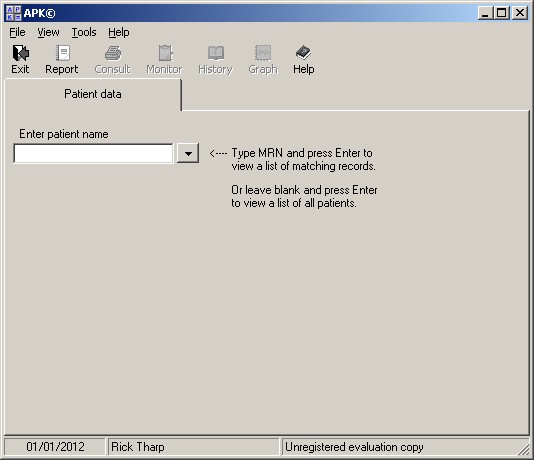
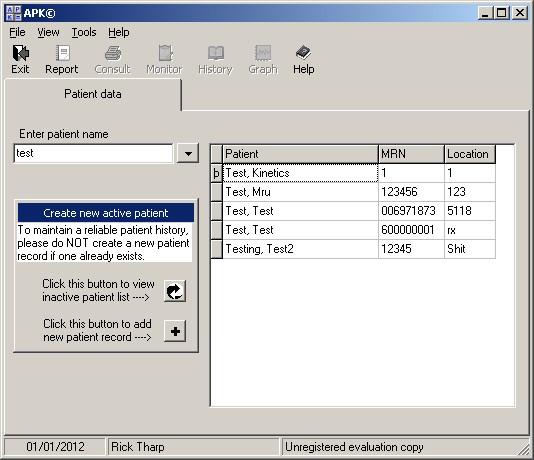
APK received a complete makeover in version 3.5.4. The most apparent change is the patient database interface. The program now starts with a simple search box. Type in a patient name to find matching records, or press Enter to list all patients. The user cannot add a new patient until record search has been performed. The intent is to cut down on entry of duplicate records for the same patient.

Start screen:

APK start

APK start

Search results:

APK search list

APK search list

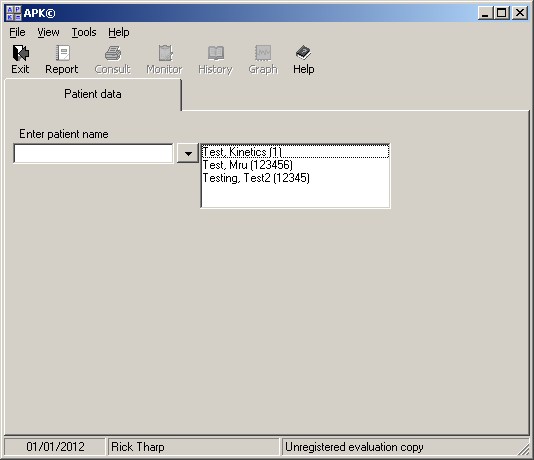
MRU drop down:

APK MRU list

APK MRU list

Complete APK 3.5.4 change listing:

  1. Added Overlay to patient tab with search as the default start up point.
  2. Added Most recent used patient list.
  3. Added Search listing.
  4. Updated SrCr fields to allow 2 decimal places.
  5. Added Print T90% and T95% to consult report.
  6. Added BMI to patient data tab.
  7. Added mouse hover to view dose in mg/kg.

P.S. this new version of WordPress is buggy, the picture upload feature is broken. When I click to add a pic, it blackens the screen and… nothing. Had to add pix via pain-in-the-ass HTML code. Also, the code formatting plug-in does the same thing, blacks out the screen completely without any functionality, so I could not post the Adjust CL to IBW code. Found this on the wordpress forums: I think we can confirm that it is a mistake of the last update of wordpress