Unicode support for RikiTikiWiki

The lack of Unicode support in the wiki is something that has bugged me for a couple of years. M$ Word is the usual source of these non-standard characters, such things as em- and en-dashes and curly (smart) quotes. If these non-ASCII (non-keyboard) characters were pasted into a topic they would be displayed as garbled nonsense in the viewer and editor.

garbled_display

Display

Editor

This project was written in Delphi 2007 which does not natively support Unicode. I have XE, but I have no desire to go through the hair-pulling, forehead-slapping ordeal of updating all of the components in this project to yet another version of Delphi.

Since it did not support Unicode, the most likely suspect to me was the standard TRichEdit component. So, back in April I purchased the TMS Unicode component package. Well, that didn’t get very far because there was a major bug in the search function. Really, what good is a wiki without a search function? So, I emailed support and they put it on their to-do list. Eventually it got fixed and I updated that component this morning. Unfortunately that didn’t fix anything. So began the dogged pursuit of a fix.

The next suspicious component on the list was the HTML viewer. So, I found an update to the 5 year old open source component on code.google. After removing the old and re-compiling the new, no change.

Still believing it was a component problem, I looked into the database driver as the culprit. I pulled up SQL manager and did a dump of the raw data. It was fine, all the proper Unicode characters were there.

Then I began to believe that it had to be a problem with the variable declaration. All the experts on stack overflow had an opinion on what was the best string type to use for Unicode, and they were all different. So, I systematically changed the variable holding the text to every oddball string type available in Delphi: Utf8String, WideString, ANSIstring, and RawByteString. It didn’t matter, the output was still garbled.

I finally came across the open source Fundamentals code library on SourceForge. Included in that library were various decoder routines for converting character sets and encodings to and from Unicode. A function within it called UTF8StringToUnicodeString was the trick. Finally, it displays Unicode formatted text properly.

clear_display

I hope all you copy-and-pasters appreciate how much fricking work this was. And don’t get me started on what a gawd-awful-piece-of-shit-poor-excuse-for-a-word-processor M$ Word is.
APK update

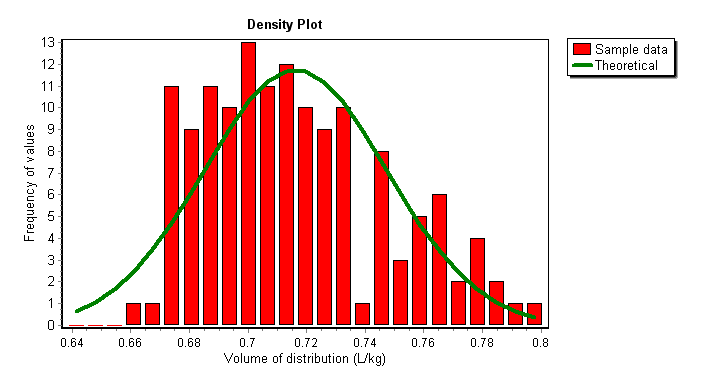
Sometimes it’s good to have a day off in the middle of the work week. I finished up something that I’ve had on my to-do list for years: a distribution plot for population analysis of Vol dist. The plot compares the 3-sigma normal distribution curve (green line) vs actual data points (red bars). Although it’s helpful to have descriptive statistics, nothing beats a picture:
Vd density plot

The population analysis report had to be re-arranged to fit the new plot on the page . I believe it is an easier read now. Here’s a comparison of new vs old:
APK_pop_analysis_new
APK_pop_analysis_old

Other improvements to the population analysis tool include:

  • BMI analysis option
  • CL vs Kel regression option
  • Automatically create/save graphs

While testing all these changes with real-world data I noticed a handful of Vd values in the consult table that were Zero. Further investigation revealed that these were *huge* patients with Vd’s > 100 liters. When I originally set up the APK database format over twenty years ago I did not forsee the U.S. obesity epidemic. Nowadays it is not unusual for us to see patients who are 300, 400, 500+ pounds, a sad commentary on the state of our country’s health. Also, I didn’t realize if the database engine encounters a number exceeding the defined field, it just skips it! It doesn’t flag an error, it just puts in a zero… WTF? Anyway, this update includes a change to the consults table, increasing the width of the Vd field from 4 to 5. This will accommodate patients up to 700 kg. If that limit is exceeded, please stop this planet and let me off.

Enjoy.

Fun with ASP.NET

I’ve been trying off and on for 5 months to get the AJAX toolkit to run on my ASP.NET WebApp site. The web host only supports ASP.NET 2.0, so finding relevant information on an 8 year old technology is challenging.

I first tried adding a reference to the DLL in an aspx page:

<%@ Register Assembly="AjaxControlToolkit, Version=1.0.61025.0, Culture=neutral, PublicKeyToken=31bf3856ad364e35" %>

The page crashed on load with this Parser Error Message: “Could not load file or assembly ‘AjaxControlToolkit’ or one of its dependencies. The system cannot find the file specified.”

I contacted the web host who stated “There is only ASP.NET 2.0 AJAX Extensions installed on the server. AJAX toolkit is not installed on the server.”

I had to ask if there was any possibility that the AJAX toolkit could be installed. The web host replied “There are two work arounds for this, first that you manually upload the DLL files into /cgi-bin folder and include the path of the DLL’s into your code and then let us know we will setup full permissions on /cgi-bin folder. Second work-around is to setup permissions for your IIS worker process user to Temporary .net folder please tell us the version of the .net you are using and we will setup the permissions accordingly.”

Since I had no idea what the second work-around was, I manually uploaded the DLL file to the cgi-bin directory.

Same error message “The system cannot find the file specified.” After some research, I added the path info to web.config:


Same error. Next, I added tagPrefix to controls:


Same error. Decided to switch tactics and go back to registering the assembly on the aspx page instead of web.config.

<%@ Register Assembly="AjaxControlToolkit, Version=1.0.61025.0, Culture=neutral, PublicKeyToken=31bf3856ad364e35" %>

Same error, more research. Decided to add Src tag:

<%@ Register Assembly="AjaxControlToolkit, Version=1.0.61025.0, Culture=neutral, PublicKeyToken=31bf3856ad364e35" Src="cgi-bin/AjaxControlToolkit.dll" %>

New error: The directive is missing a ‘tagprefix’ attribute. Added it:

<%@ Register Assembly="AjaxControlToolkit, Version=1.0.61025.0, Culture=neutral, PublicKeyToken=31bf3856ad364e35" Src="cgi-bin/AjaxControlToolkit.dll" TagPrefix="toolkit" %>

New error: The directive is missing a ‘tagname’ attribute. Added it:

<%@ Register Assembly="AjaxControlToolkit, Version=1.0.61025.0, Culture=neutral, PublicKeyToken=31bf3856ad364e35" Src="~cgi-bin/AjaxControlToolkit.dll" TagPrefix="toolkit" TagName="ajxtool" %>

New error: The ‘assembly’ attribute is not supported on this directive when a ‘tagname’ attribute is present. More research, took out the src and tagname tags:

<%@ Register Assembly="AjaxControlToolkit, Version=1.0.61025.0, Culture=neutral, PublicKeyToken=31bf3856ad364e35" TagPrefix="toolkit" %>

New error, The directive is missing a ‘namespace’ attribute. Added Namespace:

<%@ Register Assembly="AjaxControlToolkit, Version=1.0.61025.0, Culture=neutral, PublicKeyToken=31bf3856ad364e35" TagPrefix="toolkit" Namespace="AjaxControlToolkit" %>

New error: The located assembly’s manifest definition does not match the assembly reference. Aha, this was new. I double checked the version of the DLL I downloaded from Microsoft. It was version 1.0.20229.20821, not 1.0.61025.0. Finally, this worked:

<%@ Register Assembly="AjaxControlToolkit, Version=1.0.20229.20821, Culture=neutral, PublicKeyToken=28f01b0e84b6d53e" TagPrefix="toolkit" Namespace="AjaxControlToolkit" %>

So, the ASP “Parser Error” was leading me down the wrong path. The file wasn’t missing at all, it was an incorrect version match. After all that research, I knew it had to be some basic, fundamental thing I was doing wrong (it almost always is).

I went back to web.config and made the following changes.


Finally, what a relief. And all that work just to get a modal popup dialog, sheesh!

APK update

APK for Windows version 3.5.16 is available. Highlights include:

  • Added a point prediction tool.
  • Improved the ‘Outlier’ message dialog.
  • Added a goodness-of-fit indicator to the Bayesian results dialog.
  • Improved the ‘Non-steady-state’ message dialog.
  • Improved the serum level graph print-out.
  • Updated the help file.

Point prediction tool
Provides serum level prediction at any point within the dosing regimen. I find this useful for timing off-schedule doses and for evaluating non-steady-state levels.
apk_predict

Improved outlier message
Added detail to the Bayesian outlier message. Here is the old message:

And here is the improved message:

Goodness-of-fit indicator
A goodness-of-fit indicator was added to the Bayesian results dialog. This parameter is used to evaluate the reliability of the serum level analysis. The following parameters are included in the test:

  • Initial SS < 5
  • Final SS < 0.5
  • Final Vd SD < Model Vd SD
  • Final Kel SD < Model Kel SD
  • Predicted level = Measured level

If all 5 parameters are true, the measurement-to-model fit is excellent; 4/5 is a good fit; 3/5 is a fair fit; less than 3 is a poor fit.

Improved ‘Non-steady-state’ dialog
The previous dialog was wordy and vague:

The new dialog is simpler with clear choices:

APK update

Today I finished the latest update of the APK for Windows program to version 3.5.15.

Highlights include:

  • Added a “virtual log paper” tool.
  • Added automatic peak time calculation based on dist time.
  • Changed model editor to prevent name change.
  • Fixed gender choice on population analysis.
  • Fixed non-steady-state dialog.
  • Improved consult print-out: added method used, model selected.
  • Updated help file.

What I’m most proud of in this version is the new “virtual log paper” function. So many times over the years I’ve had to bring out the 3-cycle log paper to plot data for an outlier.

FYI, this is the 42nd time the program has been updated since it was first conceived in 1999. The original idea behind the APK program was to strip Kinetics down to one-compartment models only and add support for pediatric dosing. The executable was (and still is) small enough to run off a floppy drive.

But it has grown in complexity over the years. I decided to have some fun comparing code metrics from the original release to this one:

Forms: increased from 20 to 33
Code files: increased from 20 to 44
Functions: increased from 124 to 348
Events: increased from 202 to 2385 (not a typo!)
Lines of code: increased from 10,690 to 67,742.

In addition to the code base, the application includes an exhaustive help file with 81 topics, 85 images, and 14,260 lines of text.

To quote the Dude: “A lot of ins, a lot of outs, a lot of what-have-yous, and, a lot of strands to keep in my head, man. A lot of strands in old Duder’s head.”

So, forgive me if I forget your name next time we meet.

Half-life calculator

Finished up work on the latest iteration of the new program, Half-life calculator.

Summary of changes:

  • Changed serum level entry to a grid.
  • Up to 10 level/time pairs can be entered.
  • Added logarithmic graph of plot points and regression line
  • Added report function
  • Added built-in help.
  • Added save/load of serum level profiles
  • Added toolbar.

Main dialog:

Graph:

Report:

Just wish I could think of a “catchy” name for it 🙂

New app

Finished updating rxkinetics.net this week:

  • Updated the help files
  • Tweaked TPN screens
  • Added aztreonam model per request

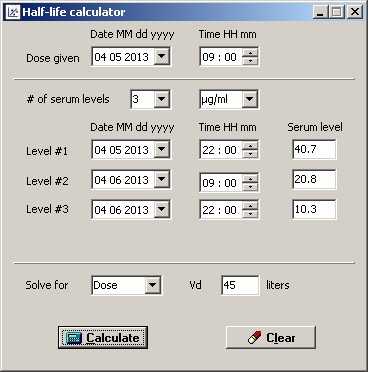
I had some time to work on a new project for the UK National Poisons Information Service. A professor there had purchased KinPlot. I sent him a note of thanks, he responding by saying “I thought it would help a clinical pharmacology student calculate a half-life which of course it does not!” After more back and forth I agreed to write a little program to estimate half-life and dose for poisoning cases. Inputs are estimated time of ingestion and 2 to 4 level/date pairs. Option to solve for dose or volume of distribution. The program calculates Kel, half-life, Cpmax, and dose (or Vd) using least squares linear regression. Screen shot:
half_life

I will be adding graph and report functionality when I find more time. I am thinking about somehow incorporating this into my pk programs. After 30 years I may be able to finally put away the 3-cycle log paper. But then again, I think I would miss it.

TPN WebApp

Today I finally figured out how to increase the size of the lines in the nutritional assessment grid.

I was following Microsoft’s example code to a “T”
How to Set Pen Width and Alignment

But, as is usually the case, the devil is in the details. No one ever gives you the complete story. They give you just enough information to frustrate you. By trial and error I found out why it wasn’t working. I was declaring the Pen object inside the DrawGrid subroutine. For some silly reason, it has to be declared globally. I never would have guessed that.

Anyway, the grid looks much better now:
Nutritional assessment grid

WebApps Update

Finished the rewrite of the rxkinetics.net web site this week.

DripCharts© and TPNassist© were both changed to use cookies instead of server memory.

Looking at the traffic statistics, it doesn’t look like anyone is using the TPN program. But I spent 3 days working on it anyway.

Highlights of the TPNassist© changes:

  • Improved the layout on all the pages.
  • Improved the electrolyte calculations.
  • Improved the TPN summary report.
  • Added user-friendly error pages.
  • Added email functionality to the enteral summary page.
  • Updated the nutritional assessment calculations per latest recommendations.
  • Wrapped all database calls in Try..Finally blocks to decrease errors.

Finally, and what I’m most proud of, I added Calcium Phosphate solubility curve generation to the electrolytes assessment.

Maybe someone will start using the app, but I’m not expecting it. Most aren’t willing to invest the time to learn how helpful this app can be.

Time for a beer.

Marathon Coding Session

There is a point where you have the whole program in your head at once, one with it, and you don’t want to let it go, so you keep working in a marathon burst of energy. Memexplex

Saturday was a cold, rainy, dreary day. Wifey was watching her Lifetime movies, I had nothing constructive to do. Having worked in Eclipse/Java/Android all week (and sick of it), I was looking for something different.

Changing how data is stored/shared in the WebApps had been on my ToDo list for months, but I kept putting it off because I knew it would be a mammoth undertaking. Also, I have hesitated to implement cookies because everything I’ve read says how limited (useless) cookies are for storing data. Nothing could be further from the truth. Fifty variables and one very large string array easily fit within the 4KB limits of a cookie. Chrome developer tools make the task of checking cookie size quick and easy.

It started slowly, but I soon had the whole site in my head, at once, and would not stop until I had finished. After a 10 hour marathon coding session, it was complete. The WebApps now store session data in cookies instead of server memory. This will dramatically reduce or eliminate the “Session timeout” issue with the site.

So, now you can park on a page, get a cup of coffee, eat a doughnut, do some yoga, watch some YouTube clips, check your Facebook page, and then finish up your pk consult.

Enjoy

PS. Of course, I missed one page, the CrCl page (which I never use), and was immediately called out for it. I never hear from anyone who uses the site, except when they complain. Never a “thank you”, or a “good job”. In other words, just like any regular pharmacy job 🙂