APK update

Today I finished the latest update of the APK for Windows program to version 3.5.15.

Highlights include:

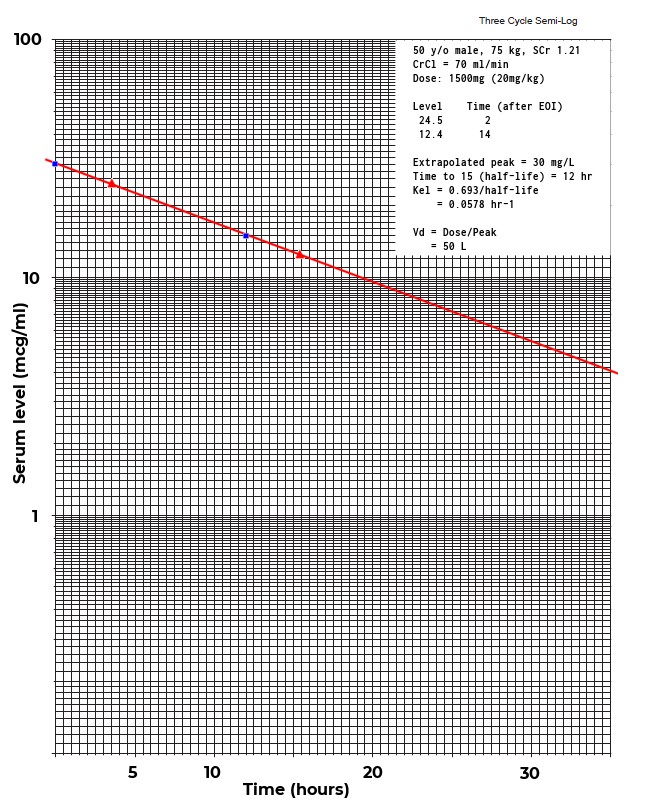
  • Added a “virtual log paper” tool.
  • Added automatic peak time calculation based on dist time.
  • Changed model editor to prevent name change.
  • Fixed gender choice on population analysis.
  • Fixed non-steady-state dialog.
  • Improved consult print-out: added method used, model selected.
  • Updated help file.

What I’m most proud of in this version is the new “virtual log paper” function. So many times over the years I’ve had to bring out the 3-cycle log paper to plot data for an outlier.

FYI, this is the 42nd time the program has been updated since it was first conceived in 1999. The original idea behind the APK program was to strip Kinetics down to one-compartment models only and add support for pediatric dosing. The executable was (and still is) small enough to run off a floppy drive.

But it has grown in complexity over the years. I decided to have some fun comparing code metrics from the original release to this one:

Forms: increased from 20 to 33
Code files: increased from 20 to 44
Functions: increased from 124 to 348
Events: increased from 202 to 2385 (not a typo!)
Lines of code: increased from 10,690 to 67,742.

In addition to the code base, the application includes an exhaustive help file with 81 topics, 85 images, and 14,260 lines of text.

To quote the Dude: “A lot of ins, a lot of outs, a lot of what-have-yous, and, a lot of strands to keep in my head, man. A lot of strands in old Duder’s head.”

So, forgive me if I forget your name next time we meet.

Half-life calculator

Finished up work on the latest iteration of the new program, Half-life calculator.

Summary of changes:

  • Changed serum level entry to a grid.
  • Up to 10 level/time pairs can be entered.
  • Added logarithmic graph of plot points and regression line
  • Added report function
  • Added built-in help.
  • Added save/load of serum level profiles
  • Added toolbar.

Main dialog:

Graph:

Report:

Just wish I could think of a “catchy” name for it :)

New app

Finished updating rxkinetics.net this week:

  • Updated the help files
  • Tweaked TPN screens
  • Added aztreonam model per request

I had some time to work on a new project for the UK National Poisons Information Service. A professor there had purchased KinPlot. I sent him a note of thanks, he responding by saying “I thought it would help a clinical pharmacology student calculate a half-life which of course it does not!” After more back and forth I agreed to write a little program to estimate half-life and dose for poisoning cases. Inputs are estimated time of ingestion and 2 to 4 level/date pairs. Option to solve for dose or volume of distribution. The program calculates Kel, half-life, Cpmax, and dose (or Vd) using least squares linear regression. Screen shot:
half_life

I will be adding graph and report functionality when I find more time. I am thinking about somehow incorporating this into my pk programs. After 30 years I may be able to finally put away the 3-cycle log paper. But then again, I think I would miss it.

TPN WebApp

Today I finally figured out how to increase the size of the lines in the nutritional assessment grid.

I was following Microsoft’s example code to a “T”
How to Set Pen Width and Alignment

But, as is usually the case, the devil is in the details. No one ever gives you the complete story. They give you just enough information to frustrate you. By trial and error I found out why it wasn’t working. I was declaring the Pen object inside the DrawGrid subroutine. For some silly reason, it has to be declared globally. I never would have guessed that.

Anyway, the grid looks much better now:
Nutritional assessment grid

WebApps Update

Finished the rewrite of the rxkinetics.net web site this week.

DripCharts© and TPNassist© were both changed to use cookies instead of server memory.

Looking at the traffic statistics, it doesn’t look like anyone is using the TPN program. But I spent 3 days working on it anyway.

Highlights of the TPNassist© changes:

  • Improved the layout on all the pages.
  • Improved the electrolyte calculations.
  • Improved the TPN summary report.
  • Added user-friendly error pages.
  • Added email functionality to the enteral summary page.
  • Updated the nutritional assessment calculations per latest recommendations.
  • Wrapped all database calls in Try..Finally blocks to decrease errors.

Finally, and what I’m most proud of, I added Calcium Phosphate solubility curve generation to the electrolytes assessment.

Maybe someone will start using the app, but I’m not expecting it. Most aren’t willing to invest the time to learn how helpful this app can be.

Time for a beer.

Marathon Coding Session

There is a point where you have the whole program in your head at once, one with it, and you don’t want to let it go, so you keep working in a marathon burst of energy. Memexplex

Saturday was a cold, rainy, dreary day. Wifey was watching her Lifetime movies, I had nothing constructive to do. Having worked in Eclipse/Java/Android all week (and sick of it), I was looking for something different.

Changing how data is stored/shared in the WebApps had been on my ToDo list for months, but I kept putting it off because I knew it would be a mammoth undertaking. Also, I have hesitated to implement cookies because everything I’ve read says how limited (useless) cookies are for storing data. Nothing could be further from the truth. Fifty variables and one very large string array easily fit within the 4KB limits of a cookie. Chrome developer tools make the task of checking cookie size quick and easy.

It started slowly, but I soon had the whole site in my head, at once, and would not stop until I had finished. After a 10 hour marathon coding session, it was complete. The WebApps now store session data in cookies instead of server memory. This will dramatically reduce or eliminate the “Session timeout” issue with the site.

So, now you can park on a page, get a cup of coffee, eat a doughnut, do some yoga, watch some YouTube clips, check your Facebook page, and then finish up your pk consult.

Enjoy

PS. Of course, I missed one page, the CrCl page (which I never use), and was immediately called out for it. I never hear from anyone who uses the site, except when they complain. Never a “thank you”, or a “good job”. In other words, just like any regular pharmacy job :)

AbPK for Android updated

I spent the last few days delving back into the dark world of Eclipse/Android/Java. I don’t wish that on my worst enemy. The simplest things seem to take forever to accomplish.

This update includes the following improvements and fixes:

  • Added extrapolated peak and trough to Model view and Email consult functions.
  • Fixed tab order on patient data and serum level screens.
  • Modified CrCl Adj body weight method to use 30% of excess weight (was 20%).
  • Moved the Email function up to a button and the Clear function down to the menu.
  • Made dialog titles one line only (quick fix to the “Huge” font problem),
  • Updated the help files.

The Jellybean “Huge” font issue seems to be a common problem among developers. Because Android does not have an “Auto-size” function, there are many code hacks for re-sizing fonts to fit text on a single line. None of the methods are fool proof. So, instead of adding all that verbose java code, I just added the layout element android:lines=”1″ for the titles on each window. A K-I-S-S solution, my favorite kind. The text is truncated, but it is simply not important.

Fixing the tab order was also a trial and error affair. The serum level input would jump from dose to trough, skipping interval and number of doses. This was also a no-code layout fix with the use of the element android:nextFocusDown=”@+id/next_text”. Many blogs leave out the “+”, but this does not work without it.

Setting up the Nexus 7 for USB debugging was an adventure as Google has hidden the developer functions in Jellybean. The weirdest thing in the setup is to set your USB connection as Camera (PTP) instead of Media device (MTP) – WTF. Here is a nice step-by-step how-to blog post:
      Nexus 7 android development

I haven’t updated the free version for nearly three years. But I did this time around, thinking maybe some of you rich freeloading pharmacists will see fit to support your fellow pharmacist and hardworking small businessman. Haha, I live in a fantasy world.

Android Fragmentation

In iOS, there are just two screen sizes and three resolutions. In the Android world we have to accommodate what is essentially an unlimited number of screen sizes and resolutions.

Android fragmentation affects developers and app users alike. Every year or so fragmentation rears it ugly head in my little world. The trigger is usually a new version of Android and/or a popular new device with an usual screen size and/or resolution. This time around it’s Jellybean and the new Google Nexus line of devices.

The effect of fragmentation on small-time developers like myself is app bashing on the public review section of Google play:
app bashing

This fellow gives my app a 1 star rating with a snarky comment about wanting his twenty bucks back. Instead of simply contacting me, he pisses all over my work. And yes I take it personally, this is my life’s work.

Turns out the issue was caused by the user himself when he changed the device font size setting to “Huge”. I wish I had a crystal ball. Six months ago, when the app was last updated, such a setting was not possible. I had no idea that Google would add such a silly font size setting to their upcoming version of Android.

This is what I hate about the Google market, or Play store, or whatever they will call it next month. Anybody with a chip on their shoulder can post an anonymous comment bashing your app. And I have no way of contacting this person to help, because comments are anonymous.

Industry watchers say that Android fragmentation is probably going to get worse. Here is a nice graphic showing the current state of Android fragmentation:

Android fragmentation

Android fragmentation map

The BBVM project, part II

Everyone who doses vancomycin knows what a crap shoot it is. Of course, that is the reason why we measure levels, there is never any certainty what levels will result.

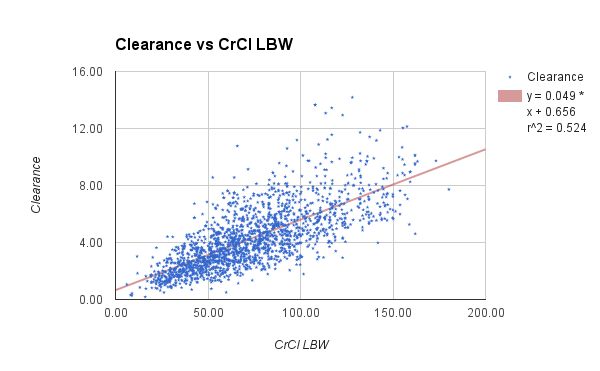
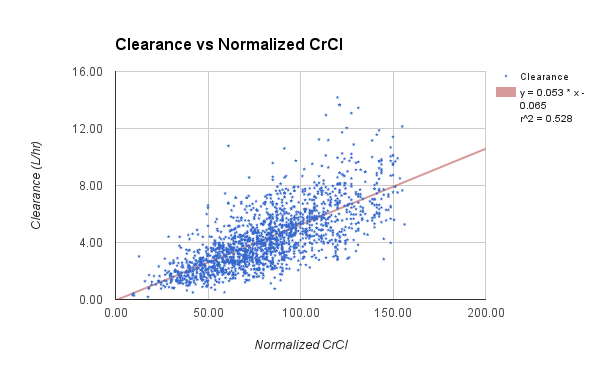
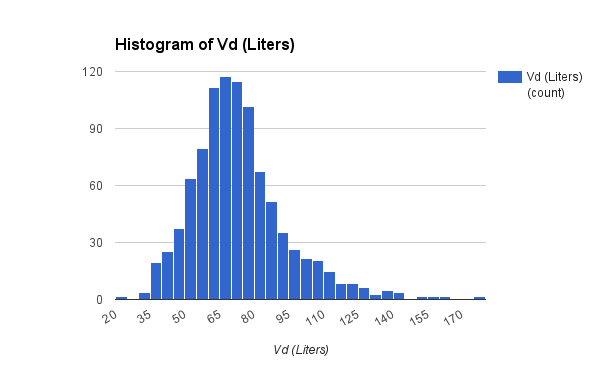
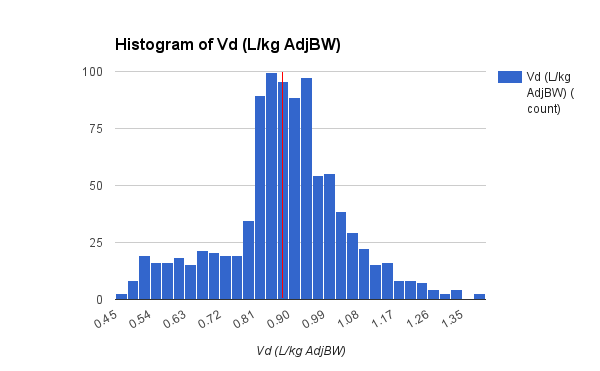
Ten years ago I had (what I thought at the time) was a great idea. You see, I have these fabulous dosing programs that save pk data. So, I will ask my fellow pharmacists to voluntarily submit their population analysis results in order to pool them together and create the “ultimate vancomycin model“.

      Build a Better Vancomycin Model project

What a bitter disappointment that turned out to be. In those ten years not one single person has bothered to lift a finger to help.

“I will”, said the little red hen. Only this time, instead of asking for help, I will gather data in stealth mode, via the web app.

The web app doesn’t collect patient identity. There is no passing of confidential information, only the following pk parameters:

  • Drug name
  • Age
  • Height
  • Weight
  • SrCr
  • CrCl
  • Kel
  • Vd

Maybe, in another ten years, there will be enough data to create the “ultimate vancomycin model“. Then the lazy dog, the sleepy cat, and the noisy yellow duck will be able to eat the bread.

Adventures in JavaScript Land

scourge 
/skərj/
Noun
A whip used as an instrument of punishment.

Of all the scourges inflicted on developers, the JavaScript/jQuery/CSS/HTML5 model has to be the worst.

What bothers me about this paradigm is the drain in productivity. So much time is wasted on the most basic task, page layout.

Coding HTML has always reminded me of hand-writing TurboPascal code back in the Eighties (which I actually enjoyed). But CSS/jQuery adds a mind-numbing and eye-straining verbosity that tests the patience of the most dogged developer.

Is there a limit to how many div tags a page can have? Does every element need an identical name and id tag? jQuery mobile grid layout actually makes me wistful for tables.

And, like so many other programming languages, books, tutorials and examples only take you about halfway there.

Too many ‘helpful’ CSS web sites consist of stupid pet tricks – how to code some silly visual effect, with little practical coding examples.

My problem is, I’ve yet to find a decent editor to improve productivity. Dreamweaver came close, but its’ Mac-like quirks keep putting me off.

Every time I work in JavaScript, this song plays in my head.

Whipping Post

Hour after hour of ass-numbing coding this week produced but this one web page, which has very limited functionality:

abpk_web